> For the complete documentation index, see [llms.txt](https://docs.limio.com/llms.txt). Markdown versions of documentation pages are available by appending `.md` to page URLs; this page is available as [Markdown](https://docs.limio.com/integrations/keeping-zuora-and-limio-in-sync/how-limio-events-updates-zuora-for-commerce.md).
# How Limio Events Update Zuora
The Limio Order Orchestration framework is designed to seamlessly manage customer interactions by creating and processing Events that align with customer actions such as New Orders, Switch Orders, Cancel Orders, and more. Each Event triggers a Process Event with specific plugins that adapt to and modify the necessary system data accordingly. Plugins, like the Zuora plugin, ensure external systems are accurately updated in response to these Events.
Limio's Zuora plugin will update the Zuora data model. This document explains how Limio updates Zuora for each customer journey. You learn more about Limio's Order Orchestration framework at:
{% content-ref url="/pages/3AkN00DYEd1aoFIXkNNh" %}
[Order Orchestration Framework](/integrations/order-orchestration/order-orchestration-framework.md)
{% endcontent-ref %}
## **How each customer journey in Limio updates Limio Events and Zuora**
The process event call outs to the Zuora REST API and will create the following objects:
### Commerce actions
The actions below typically requires the Limio and Zuora catalog to be configured to work [Catalog Configuration Overview](/integrations/zuora-integration/configuring-the-catalog.md), and are revenue-impacting.
These actions are processed via Zuora's Order API, so your Zuora tenant must have Orders (or Order Harmonization) enabled for them to work.
| Customer journey | Description | Limio event | Zuora objects created |
| -------------------------------------------------------------------------------------------------------------------------------------------------------------------------------------------------------------------------------------------------------- | ---------------------------------------------------------------------------------------------------------------------------------------------------------------------------- | ------------------------- | -------------------------------------------------------------------------------------------------------------------------------------------------------------------------------------------------------------------------------------------------------------------------------------------------------------------------------------------------------------------------------- |
| New Order | A new purchase of a customer | Order Submitted |
Order > Create Subscription
Note: Settings will impact the exact processing.
|
| [New Order (Gift Purchase)](https://docs.limio.com/integrations/zuora-integration/manage-your-pricing/how-to-sell-gift-products-with-limio-and-zuora) | A purchase of a gift for someone else | Order Submitted |
Create Customer Account
+ Create Payment Method
+ Create Debit Memo with a Charge related to a Product and Rate Plan
|
| [New Order (Gift Redemption)](https://docs.limio.com/integrations/zuora-integration/manage-your-pricing/how-to-sell-gift-products-with-limio-and-zuora) | The redemption of the gift by the gift recipient. | Order Submitted | Order > Create Subscription with no payment methods |
| [Update Subscription](https://docs.limio.com/product/self-service/what-are-the-standard-functionality-of-limio-self-service-manage-my-account/how-to-configure-an-update-subscription-flow) | A flexible update of the subscription's product(s) | Order Update Subscription |
Order > Add or Remove Product
Or Order > Update Product
Contract Effective date of the individual products will be configured on the Limio component. If a Limio Offer is added and removed as part of this Order, the Term will be updated in Zuora to align with the new Limio Offer.
If only Quantity is changed, then Update Product is used.
|
| [Switch (Upgrade/downgrade for an Active Subscription)](https://docs.limio.com/product/self-service/what-are-the-standard-functionality-of-limio-self-service-manage-my-account/how-to-create-a-personalised-switch-upgrade-or-downgrade-experience) | A change of billing frequency (e.g. monthly to annual) or a product change (e.g. silver to gold) | Order Change Offer |
Order > Update Terms and Conditions
+ Order > Remove Product
+ Order > Add Product
Contract Effective date is configured on the Limio Offer.
|
|
Switch (for a Subscription with a future-dated cancel)
| The restarting of a subscription with a planned cancellation on the same or new product (e.g. digital cancellation scheduled in 1 month, restarting on digital with 10% off) | Order Change Offer |
Order > Delete Cancel
+ Order > Remove Product
+ Order > Add Product
Note: This action only works if the Cancel is scheduled in the future.
|
| Edit Add-Ons | The addition or removal of add-ons on a Subscription | Order Update Subscription |
Order > Add Product
OR/AND Order > Remove Product
|
| [Cancel Save](https://docs.limio.com/product/self-service/what-are-the-standard-functionality-of-limio-self-service-manage-my-account/how-to-create-a-personalised-cancelsave-experience) | The addition of a % discount on an existing subscription to avoid a cancellation | Order Add Offer |
Contract Effective date is end of term by default.
|
| Cancellation | The cancellation of a subscription | Order Cancel Subscription |
Order > Cancel Subscription
+ Create Credit Memo (automatically created by Zuora - see here)
|
### Finance or Account actions
The actions below typically only require a basic [Sync Between Limio and Zuora Subscriptions](/integrations/keeping-zuora-and-limio-in-sync/sync-between-limio-subscriptions-and-zuora-subscriptions.md), and do not require a catalog.
These actions do not use the Zuora Order API (or Order Harmonization API) and will generally work regardless of your Zuora setup.
| Customer journey | Description | Limio event | Zuora objects created |
| ------------------------------------------------------------------------------------------------------------ | -------------------------------------------------------------------------------- | ----------------------------- | ------------------------------------------------------------------------------------------------------------------------------------------------------------------------------------------------------------------------------------------------------------------------------------------------------------------------------------------------------------------------------------------------------------------------------------------------------------------------------------------------------------------------------------------------------------------------------------------ |
| Update payment method | Update the payment method on the customer account | Order Change Payment |
Customer Account > Add Payment Method
Customer Account > Add Contact and set as Bill To
|
| Set default payment method | Select a saved payment method to be the default for future invoices and payments | Order Change Default Payment |
Customer Account > Payment Method > Default
Note: When a new default payment method is set in Limio, the way it is applied to outstanding invoices depends on your configuration in Limio Settings > Zuora > Zuora Orders Settings > paymentOptions.
- If Disable Auto Pay for Payment Method Updates = false (default): the new payment method will be used to automatically pay all outstanding invoices on the Zuora account.
- If Disable Auto Pay for Payment Method Updates = true: the new payment method will not be used to pay outstanding invoices.
|
| Pay invoice | Customer pays an outstanding invoice from self service | Order Pay Invoice | Payments > Create Payment applied to the selected Invoice |
| Credit Memo Order | Flexible balance management for subscriptions | Order Credit Memo |
|
| [Refund](https://docs.limio.com/salesforce/servicing-subscriptions/manage-subscriptions-flow/subflow-refund) | A goodwill or compensation refund | Order Refund |
|
| Update address | Update address on the customer account | Order Change Address | Customer Account > Add Contact on Zuora Account and set it as Sold To (delivery address) or Bill To (billing address) |
| Update customer details (Name, Email) | Update key details on the customer account | Order Update Customer Details |
Name: Customer Account > Update BillTo / SoldTo Name
Email: Customer Account > Update BillTo / SoldTo Personal Email
|
### How events works
Each event will have its own payload, available via webhooks. Limio will automatically populate the Zuora Order standard fields, as defined [here](https://knowledgecenter.zuora.com/Billing/Subscriptions/Orders/AC_Orders_Tutorials). Zuora will then update the Customer, Subscription, Payments etc… as defined in their documentation.
If you have any questions, please contact us at .
Can I take actions on a cancelled subscriptions?
When it comes to cancelled subscriptions, there are specific scenarios where certain actions can be taken. Those actions can only be triggered from Limio for Salesforce. Here's a breakdown of each situation:
a. **Switching a Cancelled Subscription:** If you are performing a switch on a subscription that has already been cancelled, the relevant cancel order will be deleted from Zuora. This ensures a smooth transition and eliminates any conflicting cancellation orders, allowing the switch to be processed accurately.
b. **Cancelling an Already Cancelled Subscription:** In some cases, you may need to cancel a subscription that has already been cancelled due to a possible error in the cancellation date or other reasons. In such instances, the relevant cancel order will be deleted from Zuora and a new cancel order will be created.
c. **Adding an Offer to a Cancelled Subscription:** Occasionally, you may need to apply an add\_offer order, typically involving the application of a discount, to a subscription that is already cancelled. In this scenario, the cancel order associated with the subscription will be deleted from Zuora, allowing the add\_offer order to be executed without any conflicts.
By deleting the relevant cancel orders in these specific situations, Zuora ensures that the subsequent actions taken on the cancelled subscriptions proceed smoothly, without any complications or conflicting instructions.
Please note that these actions are carried out to maintain data accuracy and ensure the proper execution of operations on cancelled subscriptions within the Zuora system.
How can I see the payload sent to Zuora for each event
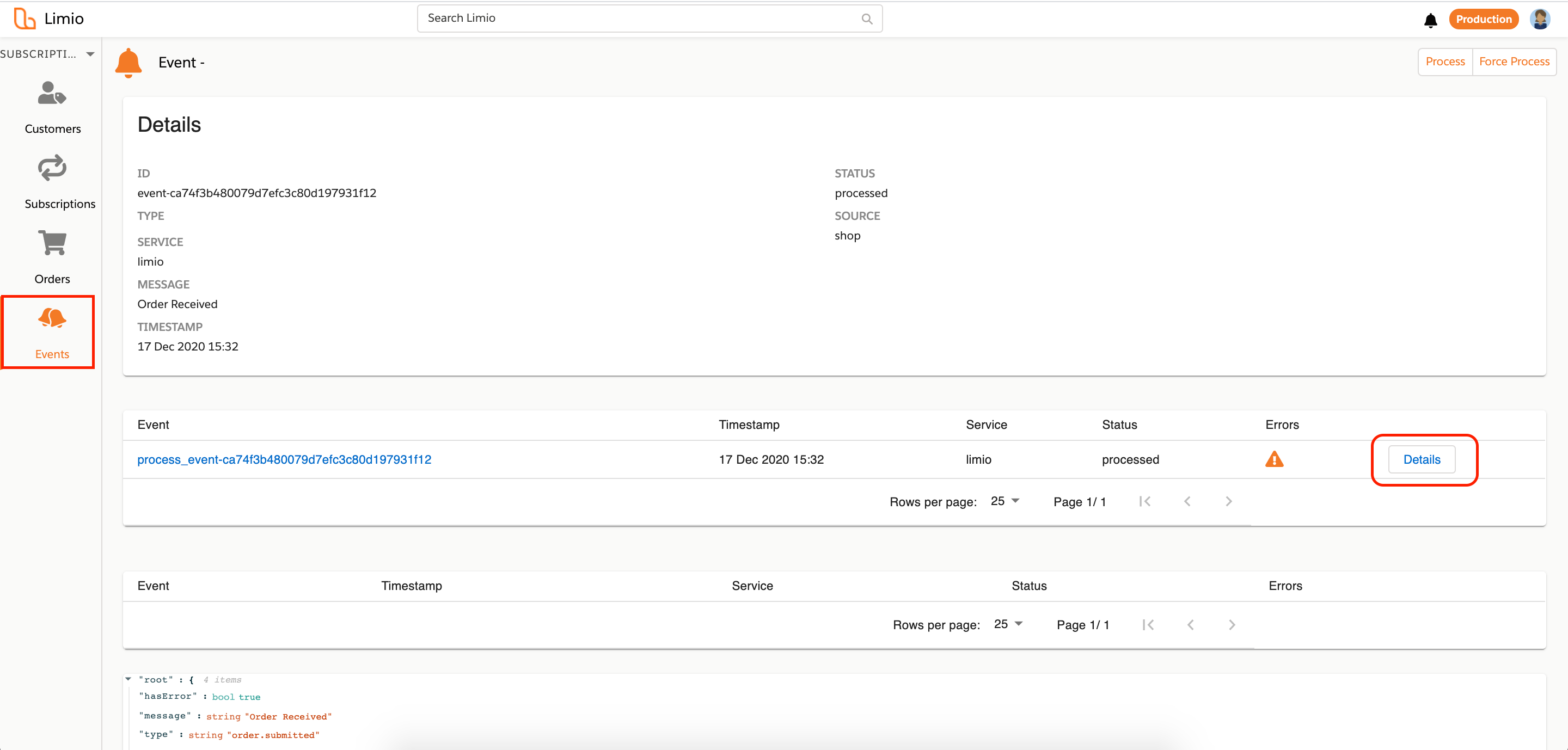
Go to Events → Process Events → Callout.
Limio allows you to view each callout made to Zuora. The table will include a timestamp, the specific endpoint called and the time taken to perform the callout. First go to Event, then the Process Event.
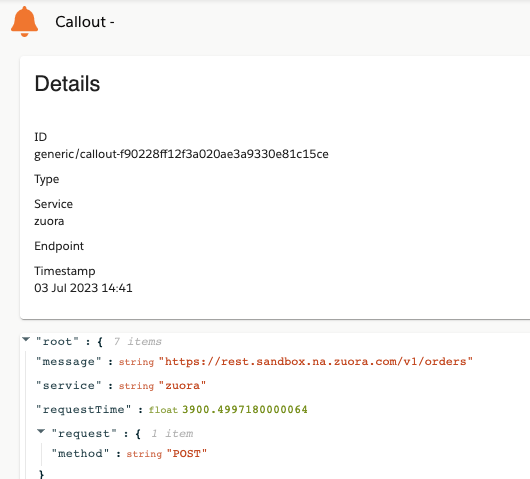
You can click on each individual callout to view the payload sent to the callout endpoint.
## Changes to the integration pattern with certain features
* **1-1 or 1-N Zuora Customer Account and Zuora Subscription:** By default, Limio will create a new Zuora Customer Account for any new subscription ordered (1-1). This is the most flexible setup as it allows to create subscription with different payment methods and avoid currency issues for example. However, it is possible to active a settings to have new subscriptions stored on the same Zuora Customer Account (1-N). To active it, please contact .
* **For customer using 1-N:**
* **Payment Profiles:** Go to [Configure Zuora Payment Profiles](/integrations/zuora-integration/configuring-payment-gateways/how-to-configure-zuora-payment-profiles.md).
* **Advanced Payment Manager:** If you are using the 1-N data model, you can also use the Advanced Payment Manager (APM) in Zuora to store payment methods at the subscription level (rather than the default Customer level). To active APM in Limio, please contact . Once activated in both Zuora and Limio, Limio will automatically populate the custom field PaymentMethodId\_\_c and PaymentGateway\_\_c on the relevant Zuora Subscription whenever a new payment method is created (for example for New Order, Switch, Change Payment). Learn more on [Set Up Zuora Hosted Payment Methods](/integrations/zuora-integration/configuring-payment-gateways/how-to-set-up-zuora-hosted-payment-methods-for-limio.md).
* **If you have Settings > Zuora > processingOptions: Collect payment on order (if payment method specified) activated**: Limio will set the processing option > collectPayment to true, which will create a Payment against the request. This applies to New Order, Switch, and Renew.
---
# Agent Instructions
This documentation is published with GitBook. GitBook is the documentation platform designed so that both humans and AI agents can read, navigate, and reason over technical content effectively. Learn more at gitbook.com.
## Querying This Documentation
If you need additional information that is not directly available in this page, you can query the documentation dynamically by asking a question.
Perform an HTTP GET request on the current page URL with the `ask` query parameter, and the optional `goal` query parameter:
```
GET https://docs.limio.com/integrations/keeping-zuora-and-limio-in-sync/how-limio-events-updates-zuora-for-commerce.md?ask=&goal=
```
`ask` is the immediate question: it should be specific, self-contained, and written in natural language.
`goal` is optional and describes the broader end goal you are ultimately trying to accomplish on behalf of the user. GitBook uses it to tailor the answer towards what is most useful for that goal.
The response will contain a direct answer to the question and relevant excerpts and sources from the documentation.
Use this mechanism when the answer is not explicitly present in the current page, you need clarification or additional context, or you want to retrieve related documentation sections.
.png?alt=media)