> For the complete documentation index, see [llms.txt](https://docs.limio.com/llms.txt). Markdown versions of documentation pages are available by appending `.md` to page URLs; this page is available as [Markdown](https://docs.limio.com/integrations/zuora-integration/zuora-order-confirmation-email-setup-guide.md).
# Zuora Order Confirmation Email Setup Guide
### Overview
This guide outlines how to trigger order confirmation emails in Zuora when a Limio order is processed, using Zuora's Extension Studio framework.
### Components Overview
The email notification system in Zuora consists of three interconnected components:
1. **Custom Events** - Define what triggers the email
2. **Email Templates** - Define the email content and structure
3. **Notifications** - Link events to templates and define delivery rules
### Setup Process
#### 1. Create Custom Event
**Location:** Extension Studio > Custom Events
* Navigate to **Extension Studio** in Zuora
* Go to **Custom Events** section
* Create a new custom event (e.g., "Limio Free Trial")
* Define the event trigger conditions based on when Limio orders are processed
* Configure any custom fields or data points that should be captured when the event fires
#### 2. Create Email Template
**Location:** Extension Studio > Email Templates
* Navigate to **Extension Studio** in Zuora
* Go to **Email Templates** section
* Create a new template (e.g., "Limio Free Trial email Template")
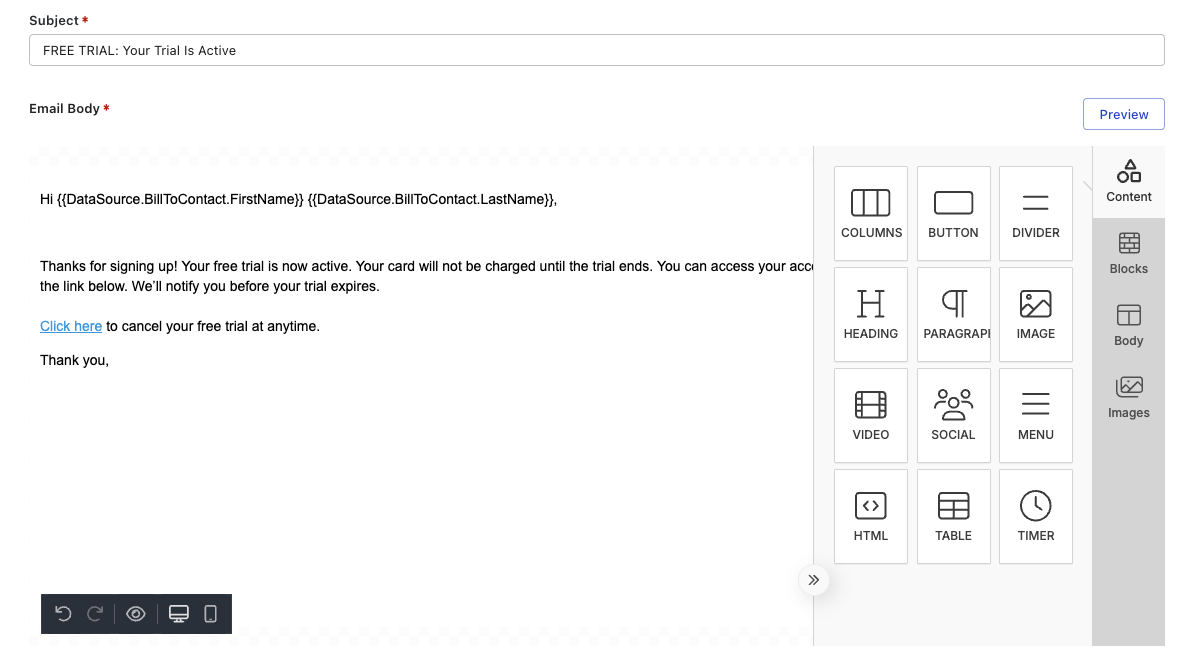
* Design the email content including:
* Subject line (can include merge fields)
* Email body (HTML/text)
* Merge fields for dynamic order data (order number, customer name, items, etc.)
* Save and activate the template
#### 3. Configure Notification
**Location:** Extension Studio > Notifications
* Navigate to **Extension Studio** in Zuora
* Go to **Notifications** section
* Create a new notification
* **Link the components:**
* **Event:** Select "Limio Free Trial (Custom Event)"
* **Template:** Select "Limio Free Trial email Template" (the email template created in step 2)
* **Recipients:** Configure who receives the email (customer email address from order data)
* **Conditions:** Set any additional conditions for when the email should send
* Activate the notification
### How Components Are Linked
```
Custom Event (Limio Order Processed)
↓
Notification (links event to template)
↓
Email Template (New Limio Order Template)
↓
Email sent to customer
```
The **Notification** acts as the bridge that connects the Custom Event to the Email Template, defining the logic of "when this event happens, send this template to these recipients."
### Key Configuration Points
* **Event Trigger:** Ensure the custom event accurately captures when Limio orders are processed
* **Data Mapping:** Verify that order data from Limio is available as merge fields in the email template
* **Recipient Configuration:** Confirm the notification pulls the correct email address from the order data
* **Testing:** Test the full flow with a test order before activating in production
---
# Agent Instructions
This documentation is published with GitBook. GitBook is the documentation platform designed so that both humans and AI agents can read, navigate, and reason over technical content effectively. Learn more at gitbook.com.
## Querying This Documentation
If you need additional information that is not directly available in this page, you can query the documentation dynamically by asking a question.
Perform an HTTP GET request on the current page URL with the `ask` query parameter, and the optional `goal` query parameter:
```
GET https://docs.limio.com/integrations/zuora-integration/zuora-order-confirmation-email-setup-guide.md?ask=&goal=
```
`ask` is the immediate question: it should be specific, self-contained, and written in natural language.
`goal` is optional and describes the broader end goal you are ultimately trying to accomplish on behalf of the user. GitBook uses it to tailor the answer towards what is most useful for that goal.
The response will contain a direct answer to the question and relevant excerpts and sources from the documentation.
Use this mechanism when the answer is not explicitly present in the current page, you need clarification or additional context, or you want to retrieve related documentation sections.
.png?alt=media)
.png?alt=media)