> For the complete documentation index, see [llms.txt](https://docs.limio.com/llms.txt). Markdown versions of documentation pages are available by appending `.md` to page URLs; this page is available as [Markdown](https://docs.limio.com/developers/custom-components/claude-code-skill.md).
# Claude Code Skill
Use AI to accelerate Custom Component development with Claude Code
The **Limio Skills** plugin for [Claude Code](https://claude.ai/code) helps you rapidly build Custom Components using AI assistance. Instead of writing boilerplate from scratch, describe what you want and let Claude generate complete, production-ready components following Limio best practices.
## What is Claude Code?
Claude Code is an agentic coding tool from Anthropic that lives in your terminal. It can understand your codebase, write code, run commands, and help you build faster. The **Limio Skills** plugin teaches Claude everything it needs to know about building Limio Custom Components.
## Installing the Limio Skills Plugin
### Prerequisites
* [Claude Code](https://claude.ai/code) installed and authenticated
* Access to your Limio Components Repository
### Installation
Open Claude Code in your terminal and run:
```
/plugin marketplace add innovate42/limio-skills
/plugin install limio-skills
```
{% hint style="info" %}
After installation, the skills activate automatically based on context — mention Limio components, `@limio/sdk`, `useCampaign`, or similar terms and the right skill kicks in.
{% endhint %}
### Available skills
The plugin provides five focused skills that cover the full component lifecycle:
| Skill | Purpose | Audience |
| ------------------ | --------------------------------------------------- | -------------------------- |
| `limio-component` | Create components with full SDK integration | Developers |
| `limio-storybook` | Set up the Storybook playground with mocked SDK | Developers |
| `limio-story` | Create Storybook stories with meaningful variations | Developers + Non-technical |
| `limio-sdk-verify` | Audit existing code for SDK compliance | Developers |
| `limio-setup` | Connect to Limio, manage credentials, deploy | Developers + Non-technical |
Each skill triggers automatically based on what you ask — no manual selection needed.
### How it works
The skills provide an end-to-end workflow: **describe → generate → preview → refine → deploy**.
1. **Generate the component** (`limio-component`) — creates all files following Limio best practices
2. **Set up a Storybook playground** (`limio-storybook`) — mocked SDK hooks, Claude Overlay, and sample data
3. **Create stories** (`limio-story`) — 3–5 meaningful variations per component
4. **Launch Storybook** — preview immediately at `http://localhost:6006`
5. **Listen for feedback** — via the Claude Prompt panel built into Storybook
6. **Iterate in real time** — make changes from the Storybook UI with hot-reload
7. **Verify SDK usage** (`limio-sdk-verify`) — audit for deprecated patterns before deploying
8. **Deploy** (`limio-setup`) — connect to your tenant and push to Limio
## Using the skills
### Creating components
Describe the component you want. `limio-component` gives Claude the full SDK reference, limioProps configuration, add-to-basket patterns, and Page Builder compatibility guidance.
### Example prompts
**Basic offer cards:**
```
Create a Limio component for offer cards that displays pricing
with a monthly/annual toggle
```
**Styled component:**
```
Create a Limio offer component in the style of Spotify with
dark theme and green accent colors
```
**Full page:**
```
Build a complete subscription landing page with header, hero,
offer cards, FAQ section, and footer components
```
**Specific SDK usage:**
```
Create a header component that shows the user's email when
logged in using useUser, and a cart icon with item count
from useBasket
```
**Account management:**
```
Create an account dashboard that shows the user's subscriptions,
payment history, and available plans using useUser and useSubscriptions
```
### Verifying SDK usage
Ask Claude to audit an existing component against SDK best practices:
```
Verify this component follows Limio SDK best practices
```
`limio-sdk-verify` checks imports, hook usage, data access patterns, HTML sanitization, CSS conventions, basket/checkout patterns, and Page Builder compatibility. It produces a report with issues, warnings, and passed checks.
### Creating stories
Both developers and non-technical staff can create stories. Describe the variations you want:
```
Create storybook stories for the pricing-cards component with
dark theme and mobile variations
```
You can also describe variations in plain language — "show me what it looks like with 1 offer vs 6 offers" or "create a loading state". `limio-story` reads the component's `package.json`, maps limioProps to Storybook controls, and generates 3–5 variations.
### Connecting and deploying
Connect to your Limio tenant:
```
set up limio
```
This starts Storybook, opens the setup wizard, and walks you through entering your tenant name, region, and credentials. To deploy a component:
```
deploy the pricing-cards component to Limio
```
`limio-setup` handles git commit, push, conflict resolution, and tracks the Limio build status.
## What gets generated
For each component, Claude will create:
| File | Purpose |
| ------------------------- | ----------------------------------------- |
| `package.json` | Dependencies and limioProps configuration |
| `index.js` | React component with SDK integration |
| `componentStaticProps.js` | Props hook setup |
| `index.css` | Component styling |
Claude also generates a **Storybook story** with 3–5 variations showcasing different configurations (themes, content options, responsive states).
All generated components follow [Development Guidelines](/developers/custom-components/development-guidelines.md) and use proper [Prop Types](/developers/custom-components/prop-types.md).
### Storybook Preview
When you ask Claude to build a component, it automatically sets up a **Storybook playground** in `component-playground/` with:
* **Storybook 8** configured with webpack aliases to mock `@limio/sdk`
* **Full mock implementations** of all SDK hooks (`useCampaign`, `useBasket`, `useUser`, `useCheckout`, etc.) with realistic sample data including subscriptions, offers, and user profiles
* **Multiple story variations** for each component — different themes, content configurations, and visual states
* **Claude Overlay** — animated loading and deploy status screens with visual feedback
* **New Component builder** — create components directly from the Storybook UI
* **Limio Setup wizard** — connect to your Limio tenant from within Storybook
Storybook launches automatically and you can preview your component at `http://localhost:6006`. On subsequent runs, the existing playground is reused and only new stories are added.
### Interactive Editing with Claude Prompt
The skill includes a **Claude Prompt** addon panel built directly into Storybook. This creates a live feedback loop — you can request changes without leaving the Storybook UI and watch them apply in real time.
#### How to use it
1. Open the **Claude Prompt** tab in the Storybook addons panel (bottom of the screen)
2. The panel auto-detects which component you're viewing
3. Type a change request and press **Send to Claude** (or **Cmd+Enter**)
4. Claude reads the component files, applies the changes, and Storybook hot-reloads
The panel shows live status feedback so you always know what's happening:
| Status | Meaning |
| ------------- | -------------------------------------------- |
| **Listening** | Ready for your next prompt |
| **Queued** | Prompt saved, waiting to be picked up |
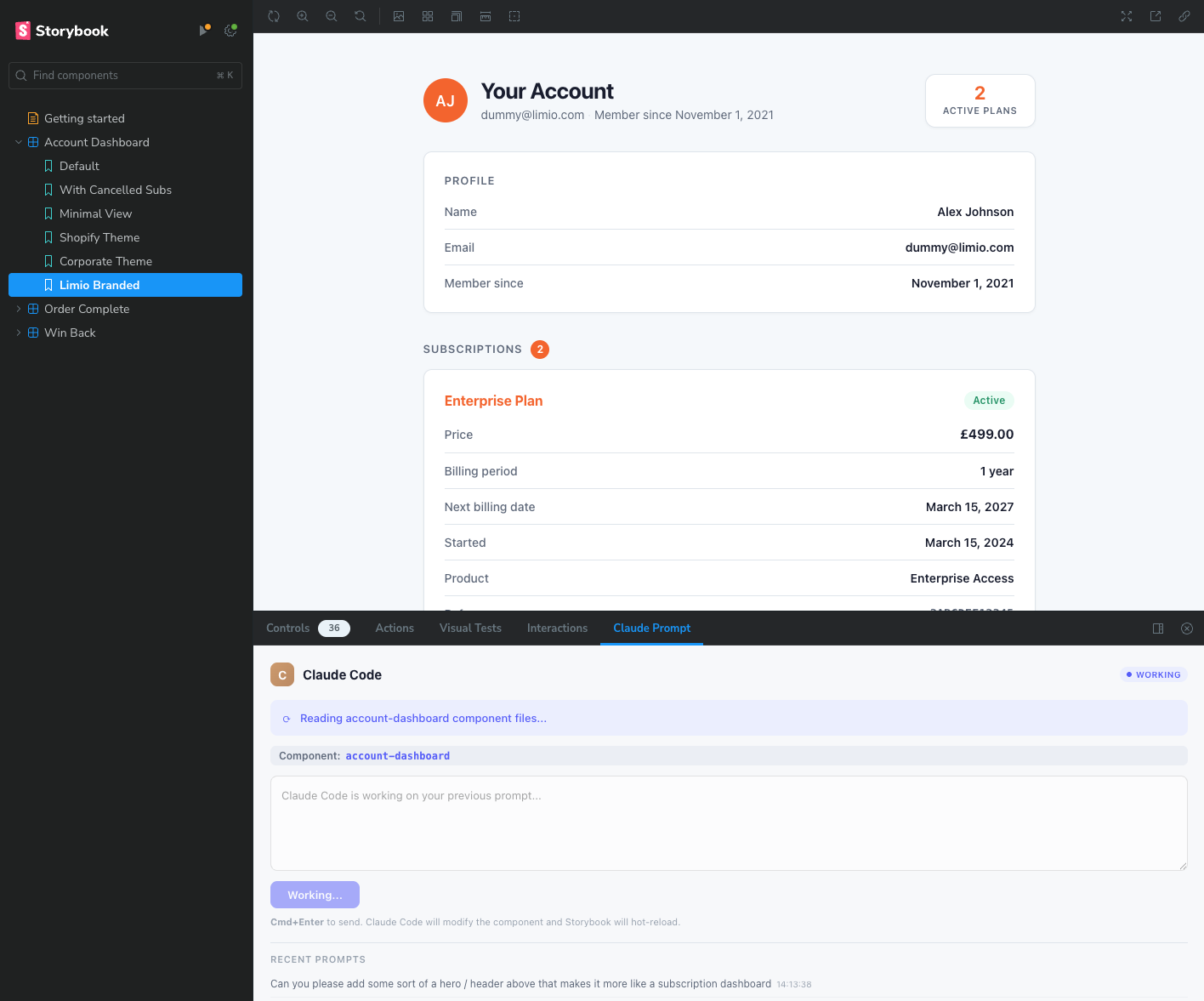
| **Working** | Claude is reading files and applying changes |
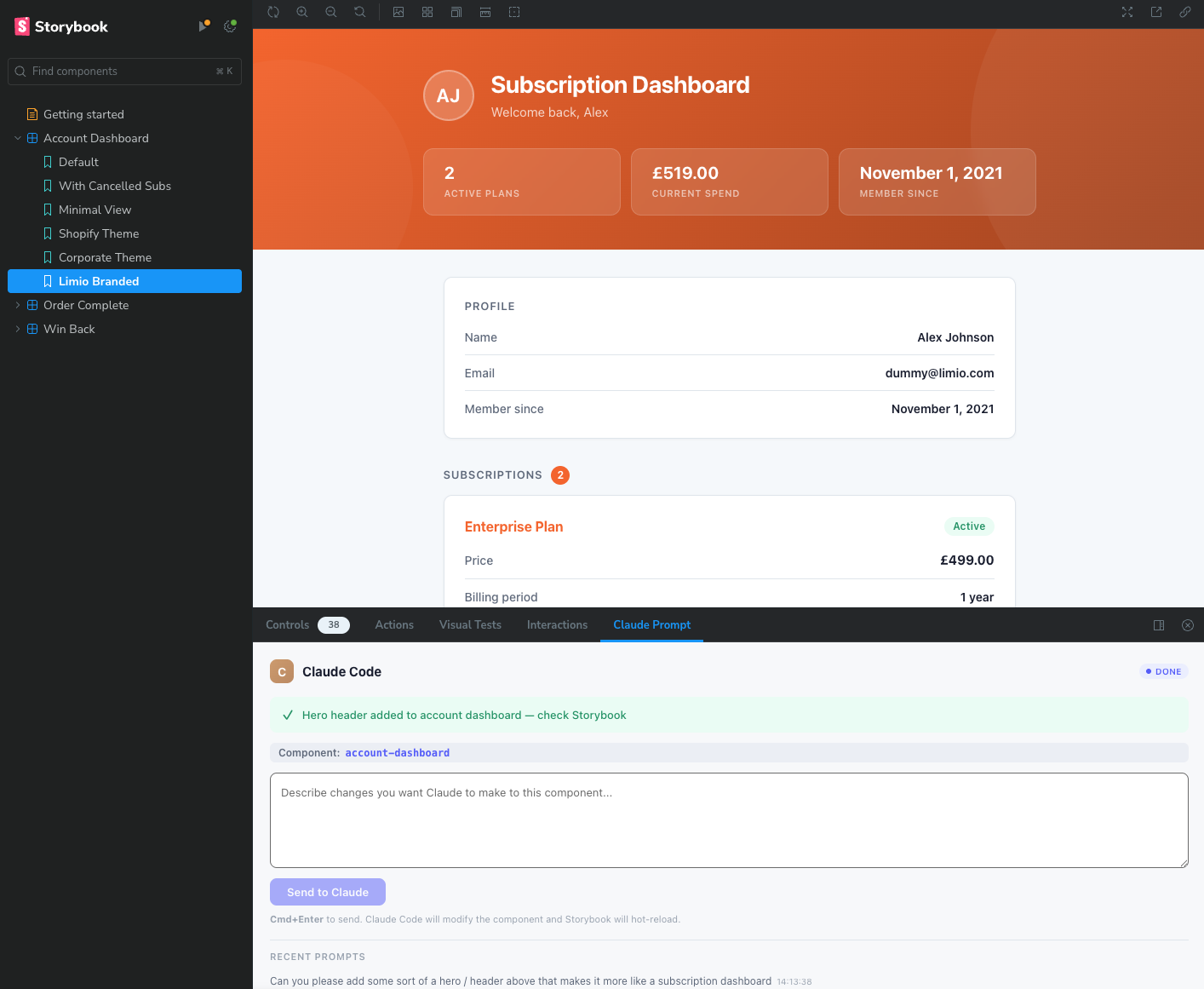
| **Done** | Changes applied — check the preview |
| **Error** | Something went wrong — check the message |
#### Example: Adding a hero header
Here's a real example of the interactive workflow in action. Starting with an account dashboard component, a prompt is sent from the Storybook panel to add a hero header:
**Before — the original component with the Claude Prompt panel showing "Working" status:**
**After — Claude has applied the hero header and the status shows "Done":**
The component updated live in the Storybook preview. The hero section includes a gradient background using the component's primary colour, a personalised greeting, and summary stats - all generated from a single prompt.
### From Storybook to Page Builder
Once your component looks right in Storybook, deploy it:
* **Quick Deploy** — type "deploy" in the Claude Prompt panel or terminal. `limio-setup` handles git add, commit, push, and tracks the Limio build status.
* **Manual deploy** — push to your repository and deploy through your [CI pipeline](https://docs.limio.com/developers/custom-components/connecting-external-ci).
The generated components are fully compatible with Page Builder:
* **All text is configurable** — headings, labels, button text, URLs
* **CSS custom properties for themes** — marketers can adjust branding in Page Builder without code changes
## Example Output
When you ask for an offer card component, Claude generates something like:
**package.json:**
```json
{
"name": "@limio/my-offer-cards",
"version": "1.0.0",
"description": "Custom offer cards component",
"main": "./index.js",
"dependencies": {
"ramda": "^0.28.0",
"xss": "^1.0.8"
},
"peerDependencies": {
"react": "*"
},
"limioProps": [
{
"id": "headline",
"label": "Headline",
"type": "string",
"default": "Choose Your Plan"
},
{
"id": "showGroupedOffers",
"label": "Enable Monthly/Annual Toggle",
"type": "boolean",
"default": true
}
]
}
```
**index.js:**
```javascript
import React, { useState, useMemo } from "react"
import { useCampaign, useBasket } from "@limio/sdk"
import { getCurrentBasketId } from "@limio/shop/src/shop/checkout/basket"
import { useStaticProps } from "./componentStaticProps"
import { groupBy, prop } from "ramda"
import xss from "xss"
import "./index.css"
const sanitizeString = (str) => xss(str || "")
const MyOfferCards = () => {
const { offers } = useCampaign() || {}
const props = useStaticProps() || {}
const { basketLoading, initiateCheckout, addOfferToBasket } = useBasket() || {}
// ... component implementation
}
export default MyOfferCards
```
### Tips for best results
1. **Be specific about styling** — mention brand names, colour schemes, or design systems you want to match.
2. **Specify SDK hooks** — if you need user data, cart functionality, or offer grouping, mention it explicitly.
3. **Describe the user flow** — explain what happens on interaction (e.g., "add to basket on CTA click").
4. **Request configurable props** — ask for "configurable copy" or "editable colors" to get limioProps that marketers can adjust in Page Builder.
5. **Use the Storybook prompt panel** — once Storybook is running, use the Claude Prompt panel for quick iterations instead of switching to the terminal.
6. **Try different story variations** — switch between stories in the sidebar to see how your component looks with different configurations.
7. **Verify before deploying** — ask Claude to verify SDK usage before pushing. This catches deprecated patterns early.
### Troubleshooting
| Issue | Solution |
| --------------------------- | ----------------------------------------------------------- |
| Skill not activating | Ensure plugin is installed: run `/plugin` to check |
| Claude exploring filesystem | Update plugin to latest version |
| Missing SDK hooks | Mention specific hooks you need (useUser, useBasket, etc.) |
| Storybook not starting | Run `cd component-playground && npm install` then try again |
| Prompt panel not appearing | Check the addons tabs at the bottom of the Storybook canvas |
| Connection to Limio failed | Verify tenant name and region in the setup wizard |
| Deploy failed | Check git status — resolve merge conflicts or set upstream |
| Build failed on Limio | Check build logs in the admin panel; verify SDK usage first |
## What's next?
You can now vibe code your first component. Read about it:
{% content-ref url="" %}
{% endcontent-ref %}
Building a chat surface on the agent client SDK? The same workflow applies, with agent-specific grounding and prompts:
{% content-ref url="" %}
{% endcontent-ref %}
---
# Agent Instructions
This documentation is published with GitBook. GitBook is the documentation platform designed so that both humans and AI agents can read, navigate, and reason over technical content effectively. Learn more at gitbook.com.
## Querying This Documentation
If you need additional information that is not directly available in this page, you can query the documentation dynamically by asking a question.
Perform an HTTP GET request on the current page URL with the `ask` query parameter, and the optional `goal` query parameter:
```
GET https://docs.limio.com/developers/custom-components/claude-code-skill.md?ask=&goal=
```
`ask` is the immediate question: it should be specific, self-contained, and written in natural language.
`goal` is optional and describes the broader end goal you are ultimately trying to accomplish on behalf of the user. GitBook uses it to tailor the answer towards what is most useful for that goal.
The response will contain a direct answer to the question and relevant excerpts and sources from the documentation.
Use this mechanism when the answer is not explicitly present in the current page, you need clarification or additional context, or you want to retrieve related documentation sections.
.png?alt=media)