> For the complete documentation index, see [llms.txt](https://docs.limio.com/llms.txt). Markdown versions of documentation pages are available by appending `.md` to page URLs; this page is available as [Markdown](https://docs.limio.com/salesforce/setting-up/additional-config/subscriptions-table-columns.md).
# Subscriptions Table
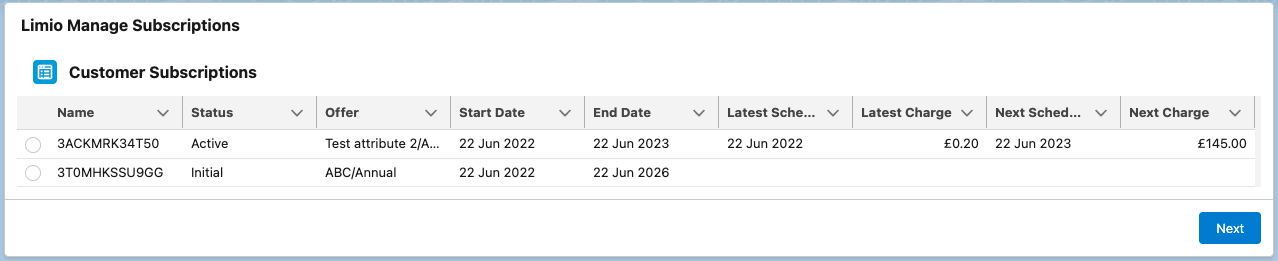
The table of customer subscriptions loaded at the start of the flow shows the columns that you set in the **Limio - Subscriptions Table Config** tab. With no configuration, it shows the default columns below.
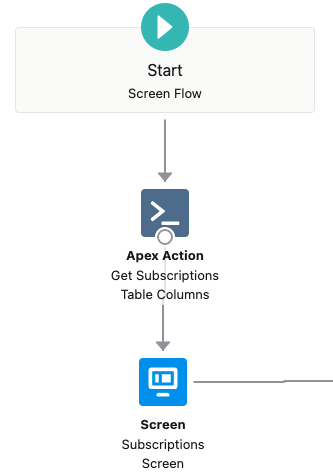
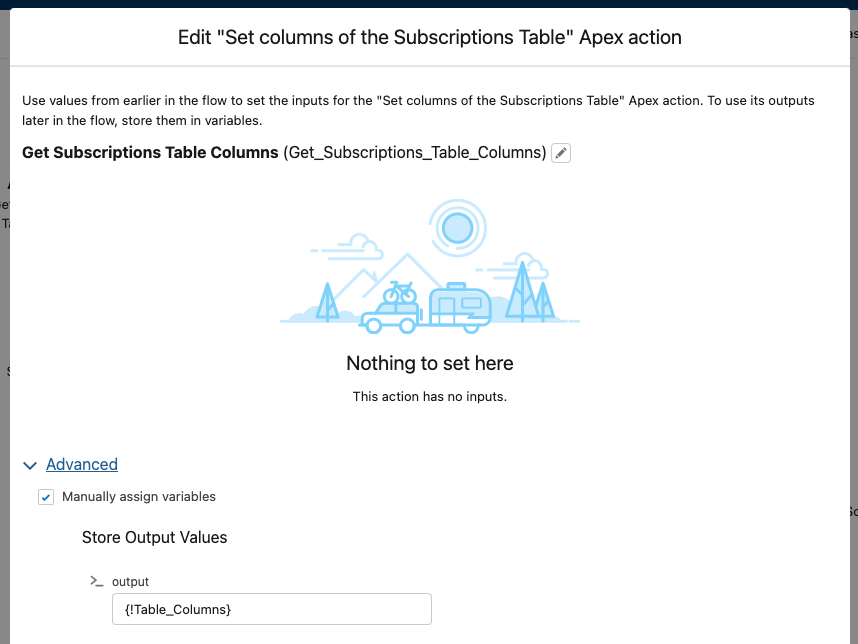
The **Get Subscriptions Table Columns By Ids** action sets the columns and their order. It uses the configuration for the account type of the record: `person` for a person account, `business` for other accounts. Without one, it uses a configuration with no account type, then the default columns. A copy of the flow made before v12.93 uses **Get Subscriptions Table Columns**, which ignores the account type. See [Implementation Note](https://docs.limio.com/salesforce/setting-up/additional-config/subscriptions-table-columns/customise-subscriptions-table.md#implementation-note).
### How to configure your subscription table columns
In Limio release **v12.29**, a no-code tool became available to our users. It allows to modify a set of columns, reorder and relabel them, learn more about it in [Column Config Tool](https://docs.limio.com/salesforce/setting-up/additional-config/subscriptions-table-columns/customise-subscriptions-table.md).
From **v14.14** the same tool can add a column for any subscription attribute Limio returns, and from **v14.22** it offers a Current Payment Method column. See [Custom Attribute Columns](https://docs.limio.com/salesforce/setting-up/additional-config/subscriptions-table-columns/custom-attribute-columns.md).
More complex customisation can need Apex. **Get Subscriptions Table Columns By Ids** in the flow can be replaced with a custom apex class to return an updated set of columns. The output generated by the new class must be of the following type:
`List`
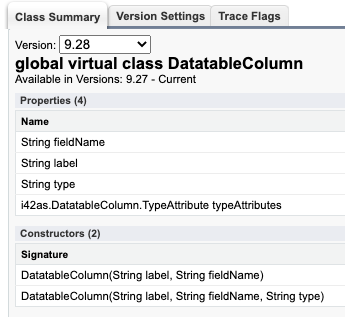
where i42as is the namespace for Limio for Salesforce. The DatatableColumn apex class is a global class with the following properties.
The first constructor is a pair column label-column name, formatted as generic string.
The second constructor allows to pass columns with specific formatting, such as date and currency.
All possible fields that can be selected as columns map to the properties of the [SubscriptionRefined](https://docs.limio.com/salesforce/setting-up/additional-config/apex-classes/apex-subscriptionrefined.md).
### Build your own columns
Below is an example that returns the list of columns currently displayed
```
List columns = new List();
columns.add(new i42as.DatatableColumn('Name', 'subscriptionName'));
columns.add(new i42as.DatatableColumn('Status', 'status'));
columns.add(new i42as.DatatableColumn('Offer', 'offerName'));
columns.add(new i42as.DatatableColumn('Start Date', 'startDate', 'date'));
columns.add(new i42as.DatatableColumn('End Date', 'endDate', 'date'));
columns.add(new i42as.DatatableColumn('Latest Schedule Date', 'billingPeriodStart', 'date'));
columns.add(new i42as.DatatableColumn('Latest Charge', 'latestCharge', 'currency'));
columns.add(new i42as.DatatableColumn('Next Schedule Date', 'billingPeriodEnd', 'date'));
columns.add(new i42as.DatatableColumn('Next Charge','nextCharge', 'currency'));
columns.add(new i42as.DatatableColumn('action'));
return new List>{ columns };
```
NOTE: if implemented as a Salesforce flow @InvocableMethod, the return type must be of type
`List>.`
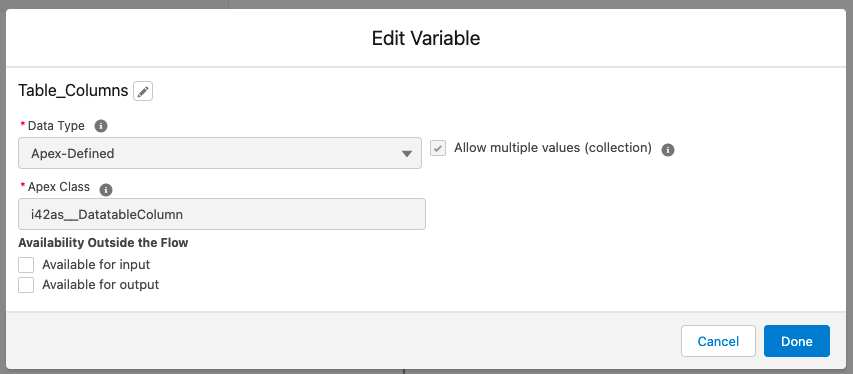
The generated output can be stored on the Table\_Columns variable of the flow, that is of the same type.
### Show "Not renewing" for cancelled subscriptions
**LFS version:** requires Limio for Salesforce v14.46 or later
A subscription can have the status **Cancelled** and an end date after today. The customer keeps the subscription until that date. The table can show **Not renewing** for these subscriptions instead of **Cancelled**.
1. Open your copy of the **Limio Manage Subscriptions** flow, and find the **Subscriptions Screen**.
2. In the **Limio Customer Subscriptions** component, set **Input: Show "Not renewing" for cancelled subscriptions still running** to **True**.
3. Save and activate the flow.
With this property, a subscription with the status **Cancelled** and an end date after today shows **Not renewing** in the **Status** column. The change is in the table only. The selected subscription keeps the status **Cancelled**, so Subscription Actions Rules, Offer Filtering Rules and the subflows get the same status as before.
The text comes from the custom label `status_not_renewing`. To change the text or translate it, edit this label in Translation Workbench.
## Tips
* for properties of type **List** (offerAllowedCountries, offerProducts) use type **"arrayToString"**
* for offerTerm - use type **"nestedObjectProperty"**
Examples:\
new i42as.DatatableColumn('Renewal Term Type', 'offerTerm', 'type', 'nestedObjectProperty');
The third argument is the offerTerm property to show: `type` or `length`.
new i42as.DatatableColumn('Products', 'offerProducts', 'arrayToString');
---
# Agent Instructions
This documentation is published with GitBook. GitBook is the documentation platform designed so that both humans and AI agents can read, navigate, and reason over technical content effectively. Learn more at gitbook.com.
## Querying This Documentation
If you need additional information that is not directly available in this page, you can query the documentation by asking a question.
Perform an HTTP GET request on the following URL with the `ask` and `goal` query parameters:
```
GET https://docs.limio.com/salesforce/setting-up/additional-config/subscriptions-table-columns.md?ask=&goal=
```
`ask` is the immediate question: it should be specific, self-contained, and written in natural language.
`goal` is what the user is ultimately trying to achieve, the reason they need the answer. Sharing it helps GitBook give you a better, more relevant answer. A goal is most helpful when it describes the outcome the user wants rather than restating the question. For example, with `ask=how do I create an API token`, a goal like `automate deployments from our CI pipeline` lets GitBook tailor the answer to that use case.
The response will contain a direct answer to the question and relevant excerpts and sources from the documentation.
Use this mechanism when the answer is not explicitly present in the current page, you need clarification or additional context, or you want to retrieve related documentation sections.