> For the complete documentation index, see [llms.txt](https://docs.limio.com/llms.txt). Markdown versions of documentation pages are available by appending `.md` to page URLs; this page is available as [Markdown](https://docs.limio.com/salesforce/servicing-subscriptions/manage-subscriptions-flow/subflow-cancel.md).
# Subflow: Cancel
### Introduction
Limio for Salesforce Manage Subscriptions flow (please, find an overview here: [Manage Subscriptions Flow](https://docs.limio.com/salesforce/servicing-subscriptions/manage-subscriptions-flow.md)) among others contains a Cancel subflow.
Depending on the scenario this flow can be used to achieve the following:
1\. cancel a subscription
2\. save a customer by offering a discount for the next term
3\. save a customer by offering a switch to a different offer in the next term
### Flow Overview
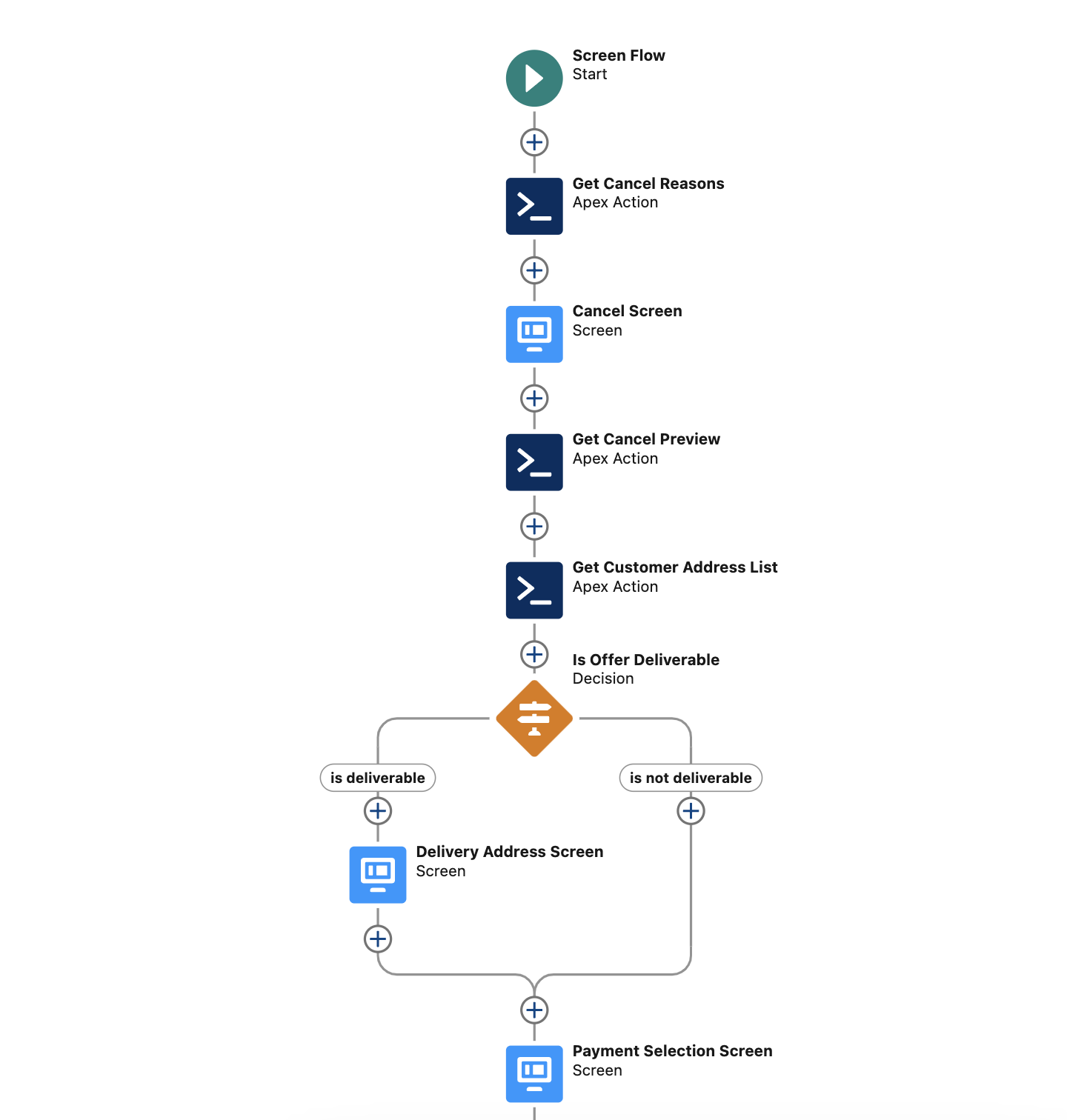
1. **Get Cancel reason** - Apex class that fetches the list of reasons defined in the metadata, find details in [Cancel Reasons](https://docs.limio.com/salesforce/servicing-subscriptions/manage-subscriptions-flow/subflow-cancel/add-cancel-reasons.md).
2. **Cancel screen**:
1. Select a discount offer or a new regular offer to save the customer
2. Use the [Initial Price Filter](https://docs.limio.com/salesforce/servicing-subscriptions/manage-subscriptions-flow/subflow-cancel/price-filter.md) to compare prices of the new offers to the next expected charge of the existing subscription
3. Specify an effective date of the cancellation
1. in cancel-save scenarios effective date is set to the end of the current billing period and cannot be modified.
2. minimum allowed effective date is the start date of the current billing period
3. maximum allowed effective date equals an end of the current billing period for termed subscriptions and is not defined for evergreen subscriptions (those that do not have an end date).
4. We plan to release an enhancement to the effective date management and allow our users to define the dates range.
4. Preview the total\
Total is received form the Zuora Preview API to be as accurate as possible in calculating changes. In case of saving a customer by switching to a cheaper offer, some amount of money is returned to the customer in a form of a credit on their account. It is possible to customise the maximum allowed credit amount returned to a customer in the flow: [Flow Customisation: Using dynamic variables that are part of an order to perform conditional logic or for merge fields](https://docs.limio.com/salesforce/servicing-subscriptions/manage-subscriptions-flow/subflow-refund/limit-refund-amount)
5. A banner at the top of the screen notifies agents if there already is a discount applied to the next billing period to prevent discount stacking.
3. **Get Cancel Preview**
1. Show billing provider preview calculations (Zuora Preview API) to the agents or build compliance scripts with a global Apex class accessible from the flow context
4. **Get Customer Address List** - fetching addresses associated with the current customer in Limio for a delivery and billing address steps.
5. **Is Offer Deliverable Decision** element & **Delivery Address screen** - when saving a customer with a new physical offer, we navigate to an address form to populate the delivery address.
6. **Payment Selection screen** - in cancel journey this is an optional step, if skipped, the order is processed against a default payment method in the billing provider (Zuora).
1. Customise the list of available options in the dropdown: [Flow Customisation: payment method options](https://docs.limio.com/salesforce/setting-up/additional-config/apex-classes/dynamic-variables)
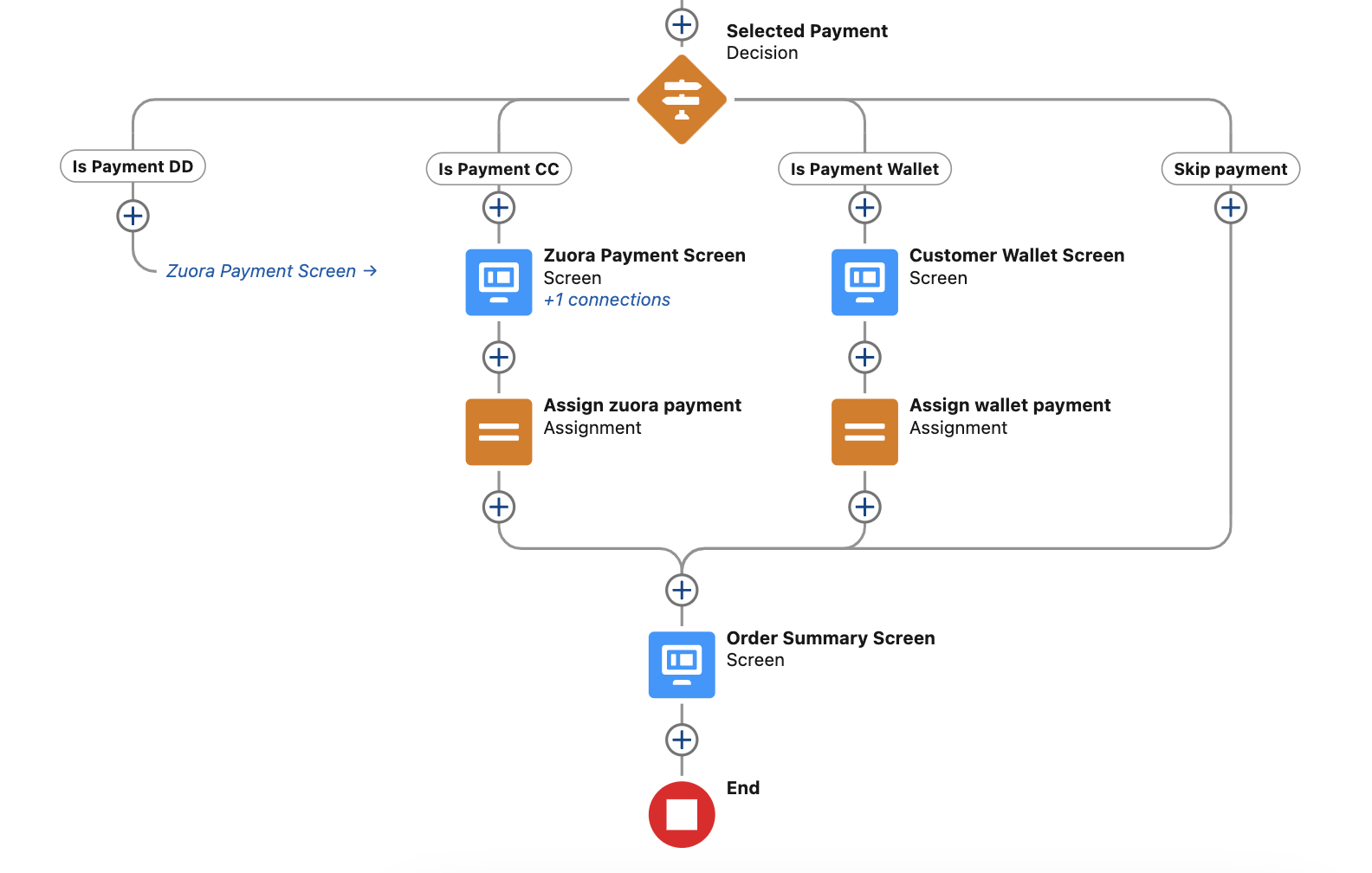
7. **Payment** **options**:
1. Debit Card, Credit Card - both options use Zuora iframe for secure transactions.
1. Gateways are being configured via metadata: [How to create a new Zuora Hosted Payment Method to use in Limio for Salesforce](https://docs.limio.com/salesforce/setting-up/detailed-salesforce-setup/zuora-hosted-payment-method)
2. Customer Wallet - contains a list of existing payment methods linked to the customer account. We use custom labels to mark payment methods that expired or are going to expire soon.
3. [Flow Customisation: Capture an additional payment](https://docs.limio.com/salesforce/setting-up/additional-config/payment-methods/capture-additional-payment)
8. **Order Summary screen** - offers an overview of the order, listing the selected offer (if any), the effective date, cancellation reason and a breakdown of the order total in the table. After submitting an order, loads order processing events in real time showing status messages per each step of the process.
1. [Flow Customisation: Add custom fields to the Billing and Delivery address objects](https://docs.limio.com/salesforce/setting-up/additional-config/addresses/custom-address-fields)
2. [Flow customisation: How to add custom fields to the order payload](https://docs.limio.com/salesforce/setting-up/additional-config/custom-fields)
### Agent's View
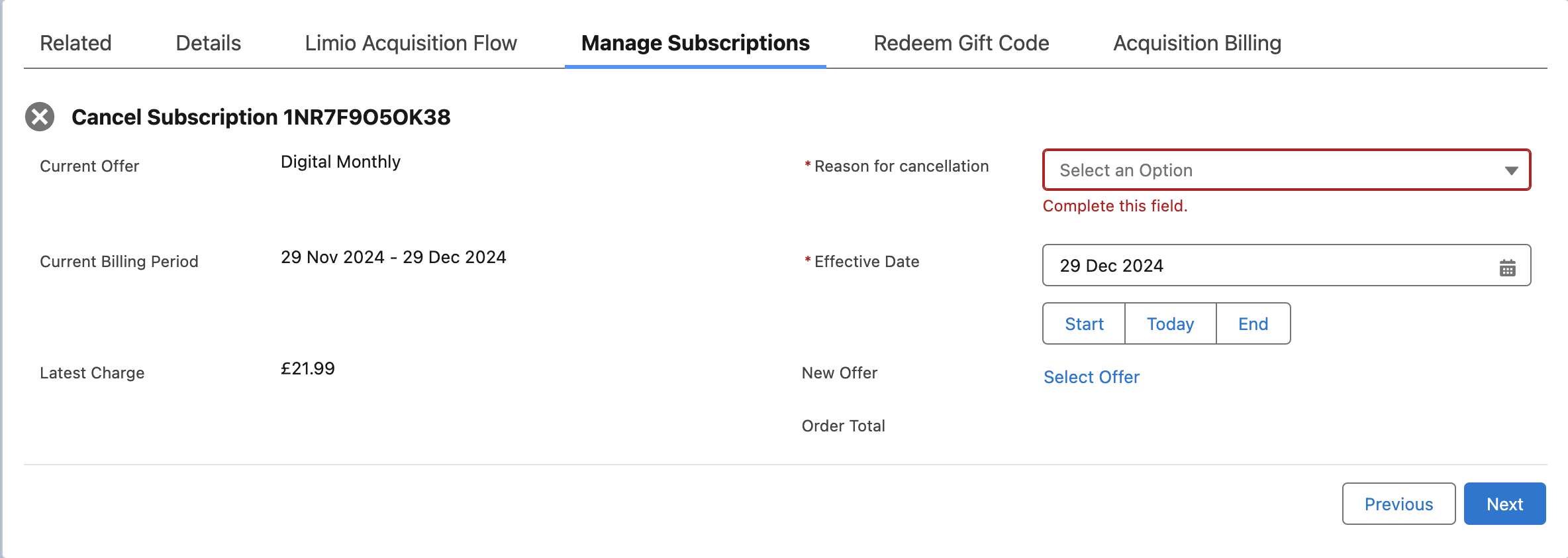
Cancel screen offers an overview of the current subscription's offer, billing period and the latest charge of the left and several input fields on the right:
\- Reason for cancellation (mandatory)
\- Effective date with buttons for shortcuts (mandatory, preset by default)
\- New Offer (optional)
\- Order Total (view only)
### Cancel V2 (Stripe)
From v13.96, orgs on Stripe get the **Cancel V2** subflow instead. Your copy of the master flow must have the decision **Cancel Payment Provider Check** after the outcome **Is Cancel Action**. A copy made before v13.96 opens the Cancel subflow for every org. See [Payment Providers](https://docs.limio.com/salesforce/setting-up/detailed-salesforce-setup/payment-providers.md). Its **Limio Order - Cancel V2** component has a **Change Offer** section, where the agent can move the customer to a different offer.
From v14.46, Cancel V2 does not run **Get Cancel Preview**. In your copy of the flow, you can stop two of the previews on the Cancel screen:
| Component | Property | Packaged value | When the value is `true` |
| ----------------------- | -------------------------------------- | -------------- | -------------------------------------------------------------------------------------------------- |
| Limio Order - Cancel V2 | Input: Skip Change Offer preview fetch | `false` | The Change Offer section does not show **Limio Change Summary**, and does not request its preview. |
| Limio Schedules Table | Input: Skip schedule preview fetch | `false` | The table of future payments does not show, and does not request its preview. |
**Limio Order - Cancel V2** still requests an order preview for the cancellation when the agent sets the cancel date. No property stops this preview.
### Tips
1. Create [Subscription Actions](https://docs.limio.com/salesforce/setting-up/additional-config/subscription-actions-rules.md) to control who can cancel subscriptions by Permission set, and which subscriptions can be cancelled. A rule with Permission Sets does not stop other agents from cancelling. They see the default actions. These include Cancel for a subscription that is not a gift and has no end date, or an end date of today or later.
2. Use [Offers](https://docs.limio.com/salesforce/setting-up/filtering-rules.md) to preload only relevant offers in the catalog.
3. Our flow allows cancelling an already cancelled subscription to change the effective date, however the total preview will not be available due to the Zuora API limitations: [Known Limitations](https://docs.limio.com/salesforce/servicing-subscriptions/manage-subscriptions-flow/subflow-revert-cancel/reverse-cancel-limitations.md)
---
# Agent Instructions
This documentation is published with GitBook. GitBook is the documentation platform designed so that both humans and AI agents can read, navigate, and reason over technical content effectively. Learn more at gitbook.com.
## Querying This Documentation
If you need additional information that is not directly available in this page, you can query the documentation by asking a question.
Perform an HTTP GET request on the following URL with the `ask` and `goal` query parameters:
```
GET https://docs.limio.com/salesforce/servicing-subscriptions/manage-subscriptions-flow/subflow-cancel.md?ask=&goal=
```
`ask` is the immediate question: it should be specific, self-contained, and written in natural language.
`goal` is what the user is ultimately trying to achieve, the reason they need the answer. Sharing it helps GitBook give you a better, more relevant answer. A goal is most helpful when it describes the outcome the user wants rather than restating the question. For example, with `ask=how do I create an API token`, a goal like `automate deployments from our CI pipeline` lets GitBook tailor the answer to that use case.
The response will contain a direct answer to the question and relevant excerpts and sources from the documentation.
Use this mechanism when the answer is not explicitly present in the current page, you need clarification or additional context, or you want to retrieve related documentation sections.