> For the complete documentation index, see [llms.txt](https://docs.limio.com/llms.txt). Markdown versions of documentation pages are available by appending `.md` to page URLs; this page is available as [Markdown](https://docs.limio.com/salesforce/servicing-subscriptions/manage-subscriptions-flow.md).
# Manage Subscriptions Flow
## Limio For Salesforce Manage Subscriptions Flow
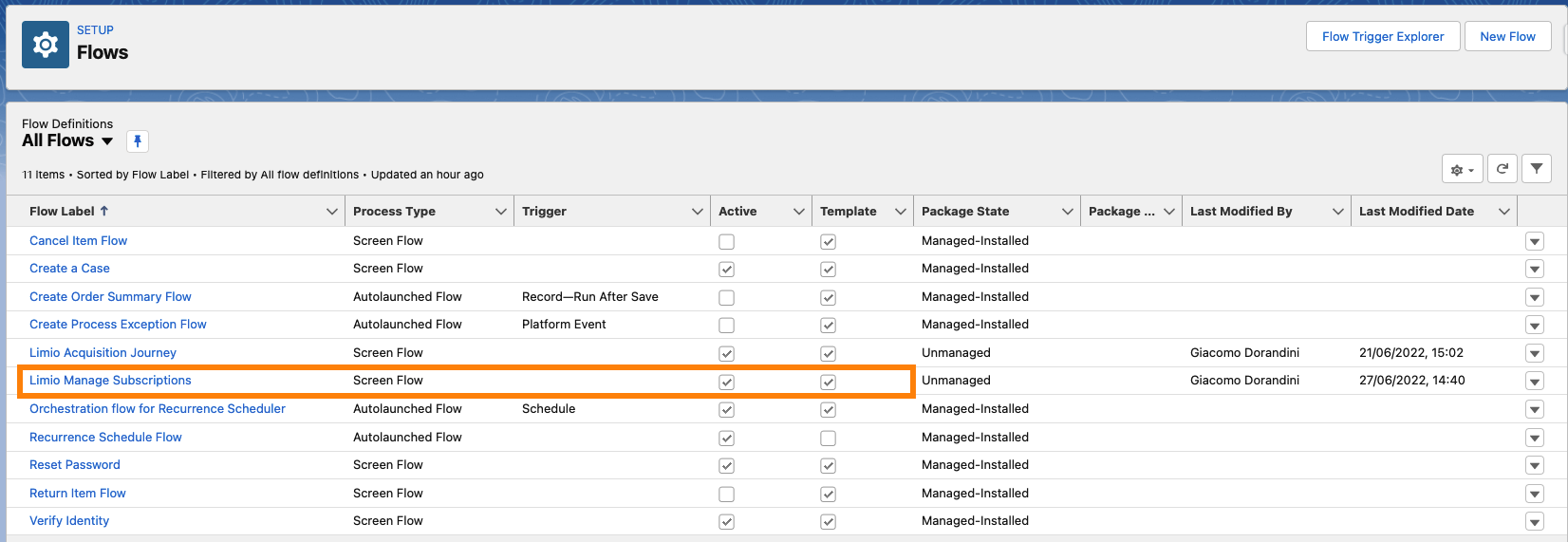
Together with the [Acquisition Flow](https://docs.limio.com/salesforce/agent-assisted-ordering/acquisition-flow.md), the Manage Subscriptions is a pre-built, template flow that allows managing existing subscriptions for a customer from a Salesforce case.
## Flow Overview
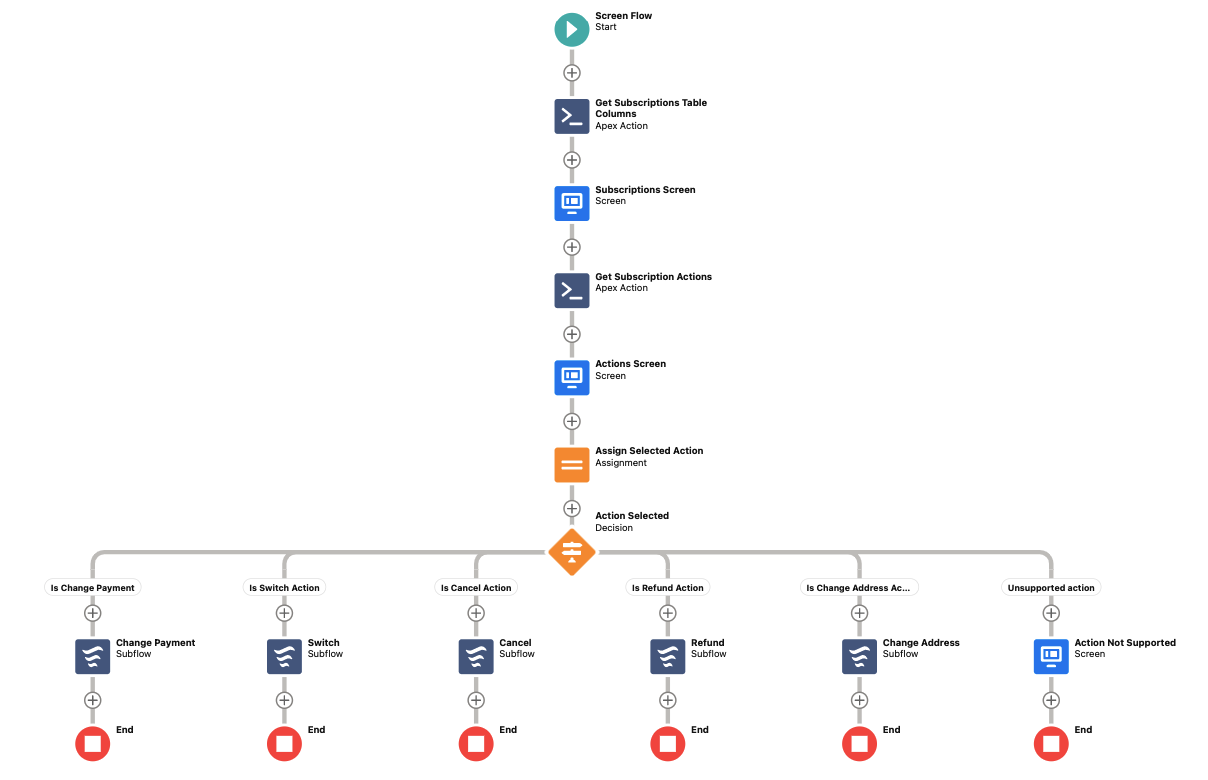
Overall, the flow consists of the following steps:
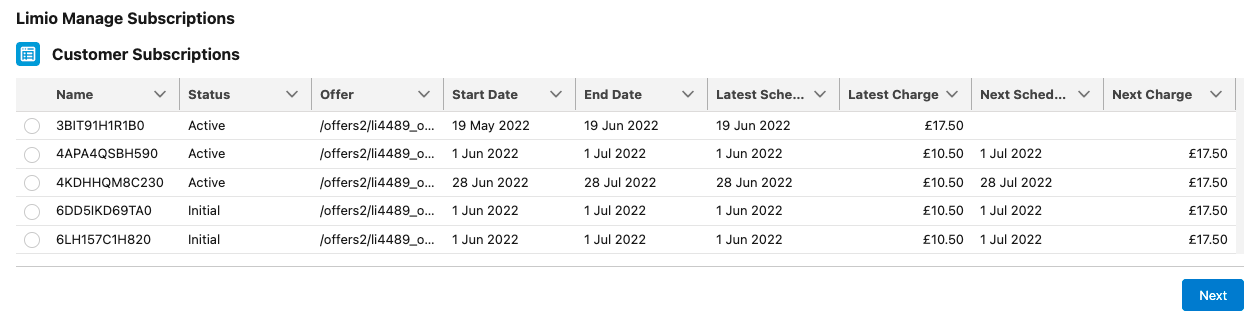
* display the existing subscriptions for the customer, with the ability to select an action to perform against it. This list could also be used to simply view the subscriptions for the customer
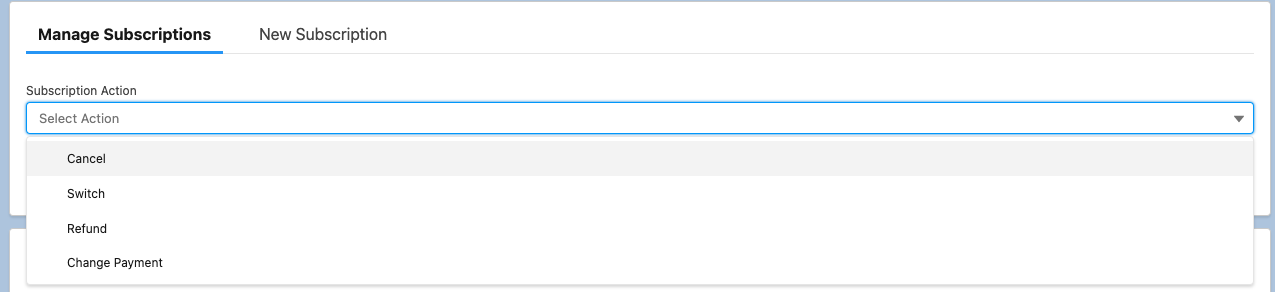
* shows the list of available actions for the selected subscription
* trigger the relevant subflow for the specific action being selected, showing the relevant steps for the specific action
* submit the order
### Subscriptions List
The flow is automatically loaded with a list of existing subscriptions for the customer, from which the user can select one to perform an action on.
The columns shown in the table can be customised in the flow, see [Subscriptions Table](https://docs.limio.com/salesforce/setting-up/additional-config/subscriptions-table-columns.md).
### Subscriptions Actions
After selecting the relevant subscription, the user is presented with a list of actions available for the subscription.
Such list can be customised in the flow and other actions be returned, see [Override Actions](https://docs.limio.com/salesforce/setting-up/additional-config/subscription-actions-rules/override-subscription-actions.md).
An Apex class called **Get Subscription Actions,** which generates the actions list, requires the following subscription fields to be provided in the method's mapping:
1. endDate
2. external
3. hasDelivery
4. isAutoRenewable
5. isGift
6. isGiftRefundable
7. offerPath
8. offerProducts
9. offerTermLength
10. offerTermType
11. status
Map these properties from the Subscriptions Screen's output property called Selected Subscription.
### Action Subflows
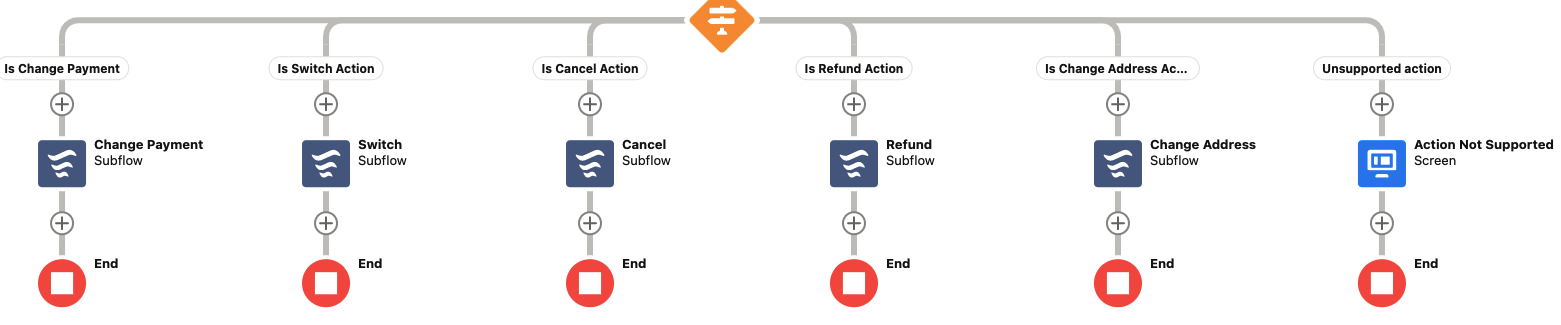
Each supported action triggers a specific subflow.
Each action represents a specific action against the subscription:
1. Change Payment
2. Switch
3. Cancel
4. Refund
* Gift Refund
5. Change Address
6. Renew
7. Credit Memo (in version **12.18** or higher)
8. Manage Add-Ons (in version **12.31** or higher). Under Stripe it is shown as Update Subscription (in version **14.02** or higher)
9. Revert Cancel (in version **12.70** or higher)
10. Redeem a Gift
11. Pause Print
The actions an agent sees depend on the payment provider. Under Stripe, the default actions are Cancel, Change Payment, Change Address and Update Subscription. See [Payment Providers](https://docs.limio.com/salesforce/setting-up/detailed-salesforce-setup/payment-providers.md).
Because each action is defined within its own subflow, they are independent from each other and can be customised autonomously.
#### Related articles:
* **Cancel:**
Cancel journey allows to re-cancel an already cancelled subscription. Learn more about taking actions against a cancelled subscription:
* If you use Zuora: [https://docs.limio.com/integrations/keeping-zuora-and-limio-in-sync/how-limio-events-updates-zuora-for-commerce](https://docs.limio.com/integrations/keeping-zuora-and-limio-in-sync/how-limio-events-updates-zuora-for-commerce "mention")
* If you use Stripe Billing: [https://docs.limio.com/integrations/keeping-stripe-and-limio-in-sync/how-limio-events-update-stripe](https://docs.limio.com/integrations/keeping-stripe-and-limio-in-sync/how-limio-events-update-stripe "mention")
Note: Zuora Preview is not available in this case, learn more here: [Known Limitations](https://docs.limio.com/salesforce/servicing-subscriptions/manage-subscriptions-flow/subflow-revert-cancel/reverse-cancel-limitations.md)
* Credit Memo: [Subflow: Credit Memo](https://docs.limio.com/salesforce/servicing-subscriptions/manage-subscriptions-flow/subflow-credit-memo.md)
* Switch: [Subflow: Switch](https://docs.limio.com/salesforce/servicing-subscriptions/manage-subscriptions-flow/subflow-switch.md)
---
# Agent Instructions
This documentation is published with GitBook. GitBook is the documentation platform designed so that both humans and AI agents can read, navigate, and reason over technical content effectively. Learn more at gitbook.com.
## Querying This Documentation
If you need additional information that is not directly available in this page, you can query the documentation by asking a question.
Perform an HTTP GET request on the following URL with the `ask` and `goal` query parameters:
```
GET https://docs.limio.com/salesforce/servicing-subscriptions/manage-subscriptions-flow.md?ask=&goal=
```
`ask` is the immediate question: it should be specific, self-contained, and written in natural language.
`goal` is what the user is ultimately trying to achieve, the reason they need the answer. Sharing it helps GitBook give you a better, more relevant answer. A goal is most helpful when it describes the outcome the user wants rather than restating the question. For example, with `ask=how do I create an API token`, a goal like `automate deployments from our CI pipeline` lets GitBook tailor the answer to that use case.
The response will contain a direct answer to the question and relevant excerpts and sources from the documentation.
Use this mechanism when the answer is not explicitly present in the current page, you need clarification or additional context, or you want to retrieve related documentation sections.