> For the complete documentation index, see [llms.txt](https://docs.limio.com/llms.txt). Markdown versions of documentation pages are available by appending `.md` to page URLs; this page is available as [Markdown](https://docs.limio.com/salesforce/cpq/manual-price-override.md).
# Price Override
{% hint style="info" %}
**LFS version:** requires Limio for Salesforce v13.40 or later\
This also requires the Limio Commerce 112 release or later
{% endhint %}
### Introduction
Many sales teams require the ability to override offer or add‑on prices directly within the **Limio for Salesforce (LFS)** quoting experience. This capability allows sales representatives to adjust pricing inline by applying a **discount percentage** or manually entering an **effective price**, providing flexibility and control during the quoting process.
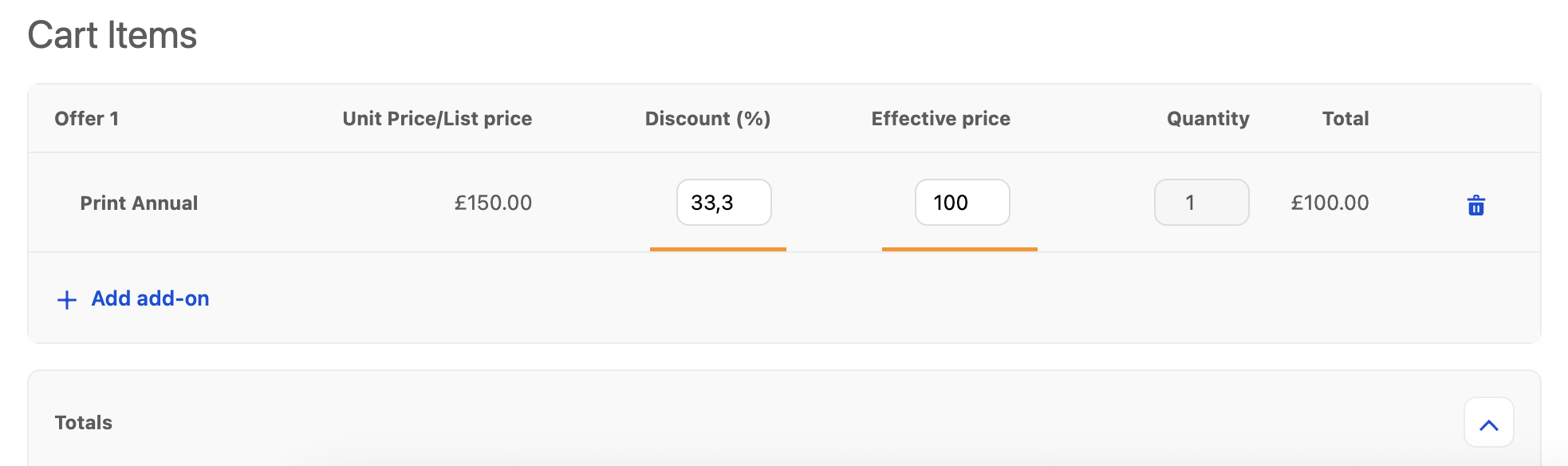
To support this, LFS Quotes introduces two new editable columns in the quote line items:
* **Discount (%)**
* **Effective Price**
When enabled, these fields allow sales reps to adjust pricing dynamically at the quote level while ensuring validation, two‑way field syncing, and proper integration with Limio Commerce.
***
### How to Set Up Manual Price Override
Follow the steps below to enable the price override fields inside the LFS flow.
#### 1. Open Your LFS Quote Flow.
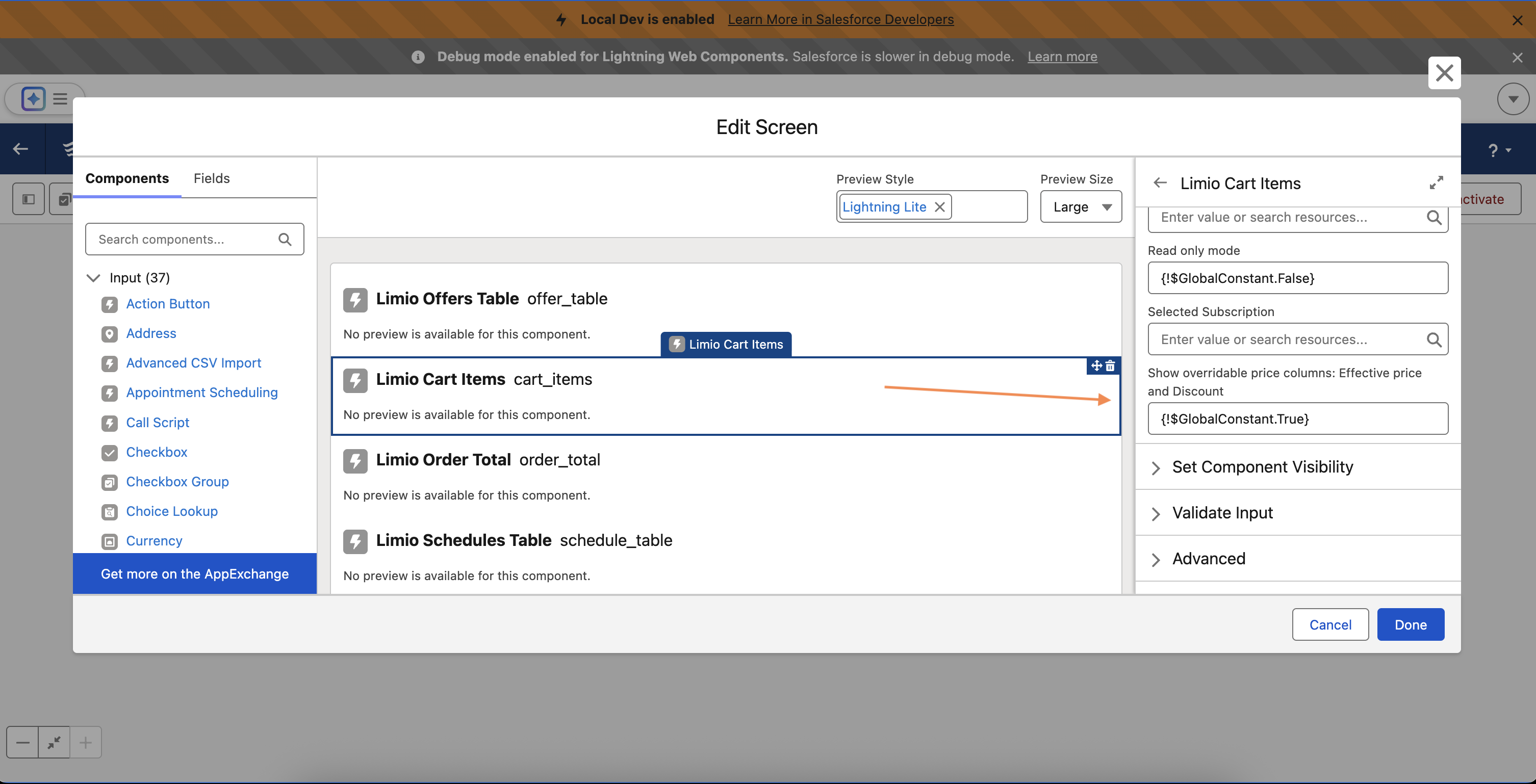
#### 2. Locate the Cart Items Component
Within the flow canvas:
1. Select the **Cart Items** Lightning Web Component.
2. In the right-hand panel (component properties), scroll to the **Display & Behavior** settings.
#### 3. Enable Overridable Price Columns
1. Find the toggle named:
* **Show overridable price columns: Effective Price and Discount**
2. Set this toggle to **TRUE**.
Enabling this option activates the following behavior in the quote context:
* **New columns appear:** Discount (%) and Effective Price.
* By default, Discount = 0% and Effective Price = Unit Price.
* Users can edit either field and values will automatically sync.
#### 4. Save & Activate the Flow
1. Click **Save**.
2. Click **Activate** to make the updated flow available to users.
***
### Usage Overview
Once enabled, the system behaves as follows:
#### When in a Quote Context
* Sales reps can edit **Discount** or **Effective Price**.
* Input validations ensure correctness.
* Total Price recalculates based on Effective Price × Quantity.
***
### Expected User Experience
* Adjust Discount (%) → Effective Price updates.
* Adjust Effective Price → Discount (%) updates.
* Both fields round to 2 decimals.
* Cannot enter invalid values:
* Discount < 0% or > 100%
* Effective Price < 0 or > Unit Price
* Errors appear inline and block saving.
---
# Agent Instructions
This documentation is published with GitBook. GitBook is the documentation platform designed so that both humans and AI agents can read, navigate, and reason over technical content effectively. Learn more at gitbook.com.
## Querying This Documentation
If you need additional information that is not directly available in this page, you can query the documentation dynamically by asking a question.
Perform an HTTP GET request on the current page URL with the `ask` query parameter, and the optional `goal` query parameter:
```
GET https://docs.limio.com/salesforce/cpq/manual-price-override.md?ask=&goal=
```
`ask` is the immediate question: it should be specific, self-contained, and written in natural language.
`goal` is optional and describes the broader end goal you are ultimately trying to accomplish on behalf of the user. GitBook uses it to tailor the answer towards what is most useful for that goal.
The response will contain a direct answer to the question and relevant excerpts and sources from the documentation.
Use this mechanism when the answer is not explicitly present in the current page, you need clarification or additional context, or you want to retrieve related documentation sections.