> For the complete documentation index, see [llms.txt](https://docs.limio.com/llms.txt). Markdown versions of documentation pages are available by appending `.md` to page URLs; this page is available as [Markdown](https://docs.limio.com/labs/labs-components/payment-expiry-alert.md).
# Payment Expiry Alert
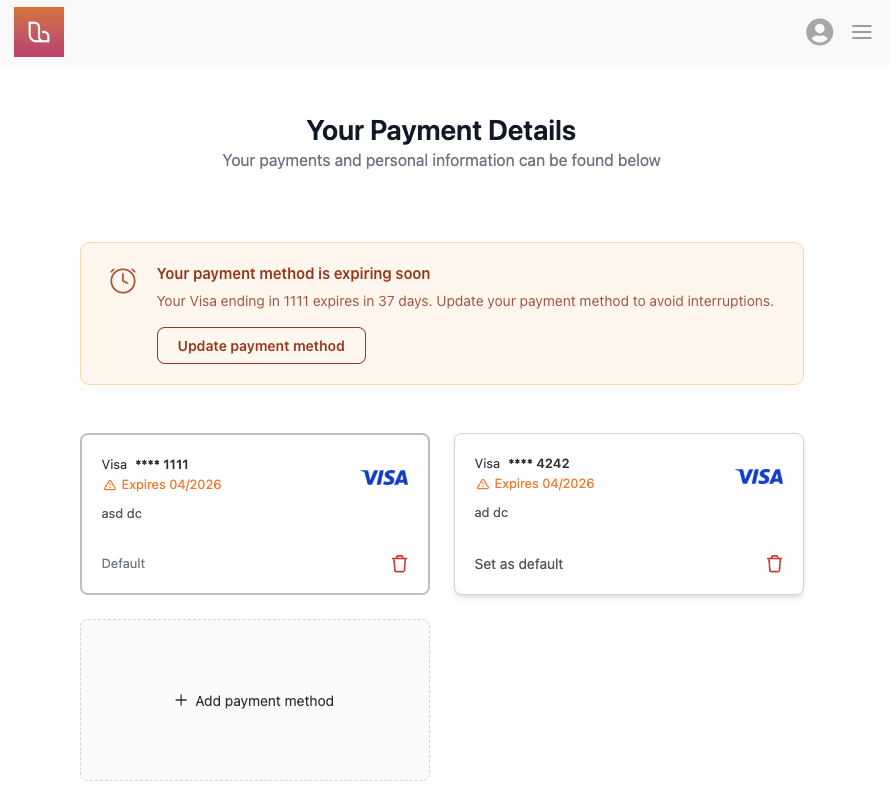
A self-service component that warns subscribers when their default payment method is expiring soon or has already expired. The component has two independently configurable states — **expiring soon** and **expired** — so you can escalate urgency as the deadline approaches.
You can configure the component to accommodate scenarios where your billing system cannot switch to backup payment methods if the default method fails. Without intervention, an expired card means failed billing and potential service interruption.
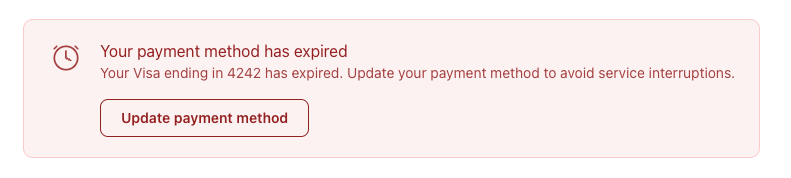
Once the payment method is expired, the visual will automatically change:
The component is built to be used alongside [Broken mention](broken://spaces/AIj7bFbTc7K2038CWL50/pages/tevbYcPiUxvUKHyi6Y2K), however it can be used anywhere within Limio Self-Service.
## How it works
The component checks the subscriber's default payment method expiry date against a configurable threshold (default: 90 days). Depending on the result, it renders one of two states:
* **Expiring soon** — the card will expire within the threshold. Shows a warning with a countdown (`{{daysUntilExpiry}}` days remaining)
* **Expired** — the card's expiry date has passed. Shows a more urgent alert prompting immediate action
Both states support template variables (`{{brand}}`, `{{last4}}`, `{{daysUntilExpiry}}`) so you can modify the copy.
A "`Show when backup payment exists`" toggle controls whether the alert appears even when other payment methods are on file. The default is "Yes — always show" because connected billing systems, such as Zuora, don't necessarily auto-fallback to backups
{% hint style="warning" %}
**Zuora users:** Zuora does not automatically fall back to backup payment methods. You need [Cascading Payment Methods](https://docs.zuora.com/en/zuora-payments/payment-orchestration/cascade-payment-methods/overview) enabled for that. This is why the default here is "always show" — only set it to "No" if Cascading is active on your tenant.
{% endhint %}
## Configuration
Everything is configurable through Page Builder prompts:
* **Per-state copy** — separate heading and description for "expiring soon" and "expired" states
* **Expiry threshold** — how many days before expiry the alert starts appearing (default: 90)
* **Backup visibility** — choose whether to show the alert when backup methods exist (recommended: yes)
* **CTA button** — configurable text and URL, shared between both states
* **Colours** — background, border, and text colour (amber warning by default, can be set to red for urgency)
For maximum control, you can place the component twice on the same page — one configured for the expiring-soon state (amber, high threshold) and one for the expired state (red, threshold set to 0).
## Placement
Designed to sit above the saved-payment-methods component on a self-service page, so it's the first thing subscribers see. Matches the same 724px desktop / full-width mobile grid layout for visual alignment.
## Why it matters
Expired payment methods are a leading cause of involuntary churn. Giving subscribers advance warning — and a clear path to update their details — reduces failed payments, support tickets, and the revenue leakage that comes with billing failures.
***
{% hint style="info" %}
**This is a Labs feature.** We're experimenting with this and it's not yet part of the core platform. Interested in early access or want to help shape it?
[Request access →](mailto:hello@limio.com?subject=Labs%20—%20Payment%20Expiry%20Alert)
{% endhint %}
---
# Agent Instructions
This documentation is published with GitBook. GitBook is the documentation platform designed so that both humans and AI agents can read, navigate, and reason over technical content effectively. Learn more at gitbook.com.
## Querying This Documentation
If you need additional information that is not directly available in this page, you can query the documentation dynamically by asking a question.
Perform an HTTP GET request on the current page URL with the `ask` query parameter, and the optional `goal` query parameter:
```
GET https://docs.limio.com/labs/labs-components/payment-expiry-alert.md?ask=&goal=
```
`ask` is the immediate question: it should be specific, self-contained, and written in natural language.
`goal` is optional and describes the broader end goal you are ultimately trying to accomplish on behalf of the user. GitBook uses it to tailor the answer towards what is most useful for that goal.
The response will contain a direct answer to the question and relevant excerpts and sources from the documentation.
Use this mechanism when the answer is not explicitly present in the current page, you need clarification or additional context, or you want to retrieve related documentation sections.