> For the complete documentation index, see [llms.txt](https://docs.limio.com/llms.txt). Markdown versions of documentation pages are available by appending `.md` to page URLs; this page is available as [Markdown](https://docs.limio.com/labs/labs-components/invoices-table.md).
# Invoices Table
A self-service component that lists a subscriber's invoices and lets them settle any outstanding balance, one invoice at a time or several at once. Subscribers select the unpaid invoices they want to clear, review the total, and pay in a single flow. This component works as part of Limio's [Broken mention](broken://spaces/xxxhzz4ER0TH1oIFAttf/pages/F0ZFM5HtNkpO7kXaaCCY).
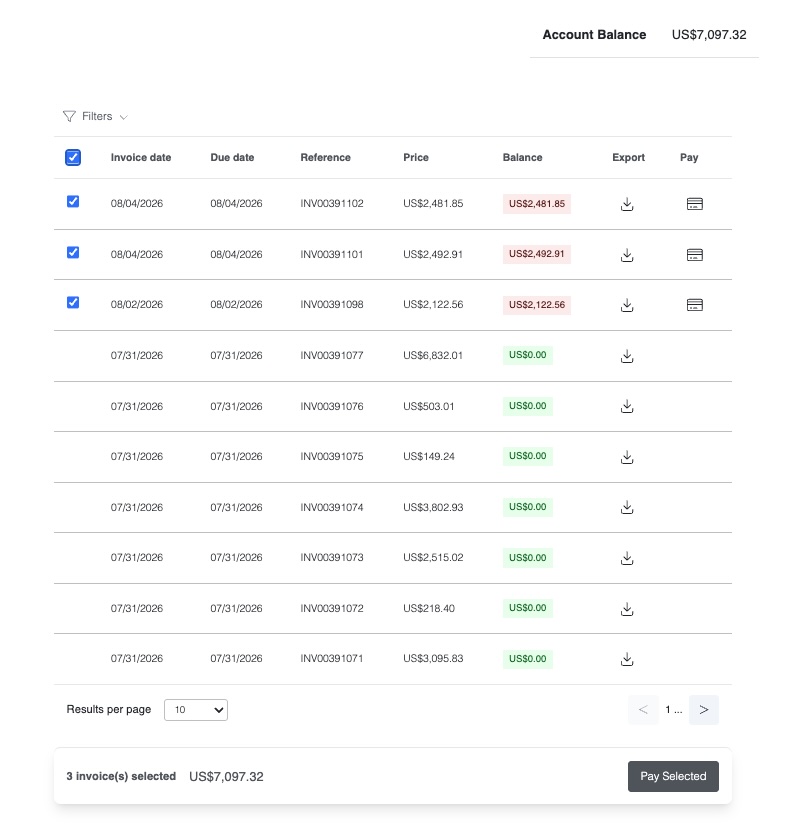
Selecting several unpaid invoices surfaces a running total and a single pay action
## How it works
The table pulls the subscriber's invoices from the connected billing system and shows the account balance plus the date, reference, amount, and outstanding balance for each. A paid/unpaid filter lets them narrow the list, and on mobile the rows collapse into cards.
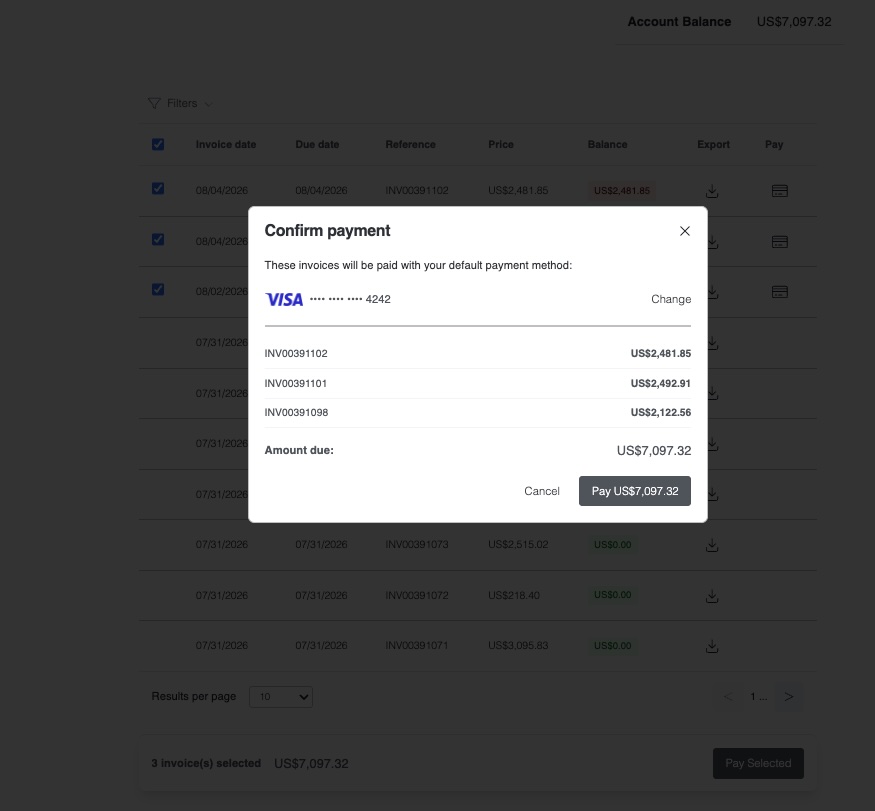
To pay, a subscriber can either open a single invoice, where they can settle it in full or enter a partial amount within the allowed range, or tick the checkboxes on multiple unpaid invoices. A floating bar keeps a running total of the selection and opens a confirmation modal that pays everything with their default payment method. Multiple invoices are paid sequentially against their individual balances, and the component reports back clearly if some succeed and others fail, so the outcome is never ambiguous. Once payment completes the list revalidates automatically to reflect the new balances.
The confirmation modal itemises the selected invoices and the total amount due
The invoice text, filter labels, and the ability to pay are all configurable per brand, so the table can be surfaced as read-only history or as a full pay-your-balance experience.
## Why it matters
Chasing unpaid invoices is a common source of involuntary churn and support load. Giving subscribers a clear view of what they owe and a one-click way to clear it, including settling a backlog of several invoices in one go, recovers revenue that would otherwise sit in dunning, without a call to the billing team.
***
{% hint style="info" %}
**This is a Labs feature.** It's experimental and not yet part of the core platform. You can use it today as a Limio Custom Component on any release. Want early access or to help shape it?
[Request access →](mailto:hello@limio.com?subject=Labs%20—%20Invoices%20Table)
{% endhint %}
---
# Agent Instructions
This documentation is published with GitBook. GitBook is the documentation platform designed so that both humans and AI agents can read, navigate, and reason over technical content effectively. Learn more at gitbook.com.
## Querying This Documentation
If you need additional information that is not directly available in this page, you can query the documentation by asking a question.
Perform an HTTP GET request on the following URL with the `ask` and `goal` query parameters:
```
GET https://docs.limio.com/labs/labs-components/invoices-table.md?ask=&goal=
```
`ask` is the immediate question: it should be specific, self-contained, and written in natural language.
`goal` is what the user is ultimately trying to achieve, the reason they need the answer. Sharing it helps GitBook give you a better, more relevant answer. A goal is most helpful when it describes the outcome the user wants rather than restating the question. For example, with `ask=how do I create an API token`, a goal like `automate deployments from our CI pipeline` lets GitBook tailor the answer to that use case.
The response will contain a direct answer to the question and relevant excerpts and sources from the documentation.
Use this mechanism when the answer is not explicitly present in the current page, you need clarification or additional context, or you want to retrieve related documentation sections.